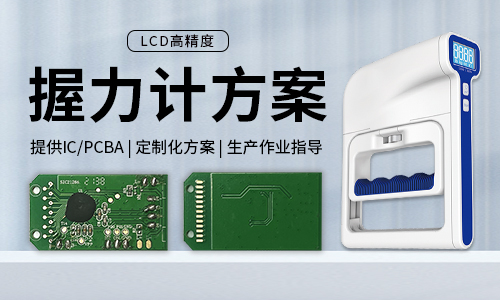
I.Technical specifications of grip strength meter
1)LCD display:888.8
2)Rated capacity:123KG
3)Scale division value:0.1KG/0.1LB
4)Minimum weighing:2KG/4LB
5)Unit:KG(default)/LB
6)Buttons:ON/OFF,START
7)Overload prompt:Display"ERR"if greater than 123KG
8)Low voltage detection:2.4±0.1V
9)Supply voltage:3.0V
10)Operating current:<15mA
11)Quiescent current:<5uA
12)Power-on method:Press the on/off button to power on
13)Shutdown time:120S
II.Grip Strength Meter Usage Function
1.Weighing:
①When turned off,press the button to turn it on.It will return to zero normally,remember the previous unit,measure once,display the grip strength value,and keep displaying the maximum grip strength value.If there is no operation until it shuts down,it will display ERR if the weight exceeds 123kg,and return to displaying the maximum value after 3 seconds.
②Press the START button to return to zero,wait for another measurement,if it is greater than 5KG,it is valid,and the"HOLD"indicator will light up
③Display the maximum grip strength value.If the grip strength increases without returning to zero,refresh the grip strength value.The grip strength value returns to zero.If the grip strength is greater than 5kg,keep displaying the maximum grip strength value.If it is less than 5kg,display 0.0kg,turn off the hold indicator,and wait for the next measurement.
2.Low Voltage Alarm:When the power supply voltage falls below 2.4V±0.1V,the device displays"Lo"upon startup and automatically shuts down after approximately 1 second.
3.Overload display:When the grip strength exceeds 123.00KG,"ERR"will be displayed.Once the grip strength decreases to below 123KG,normal measurement will resume.
4.Initial calibration:Power on and boot up.After zeroing,place a weight of over 30Kg.The version number will be displayed for 2 seconds.After the calibration zero point is stably obtained,it will display 40.0Kg.Place a 40Kg weight.After stabilization,it will display 80.0Kg.Place an 80Kg weight.After stabilization,it will display 120.0Kg.Place a 120Kg weight.After stabilization,the calibration data will be written in,followed by"PASS".The weight calibration is successful.
5.Secondary weight calibration:(1)For a calibrated scale,press the on/off button"three short and one long"to display the version number and enter calibration mode.Press the button again,and after stabilization,it will display 40.0Kg.The remaining steps are the same as step 4(to ensure accurate zero point calibration,it is recommended to wait for 2 seconds before placing the weight)